Legal
SMS opt-in flow
Last updated 2026-09-30
How a guest consents to receive a text from Fotova, shown step by step. Published so carriers and messaging providers can review an opt-in that happens on an iPad rather than a website.
Where the opt-in happens
Fotova is photo-booth software. Our customers are professional photo-booth operators; the people who receive our messages are guests at the events those operators work. A guest opts in on the operator’s iPad, at the booth, in the seconds after their photos are taken.
There is no website sign-up and no account. Guests never register, never log in, and never pay. That is why this page exists: the opt-in screen is inside an iPad app at a private event, so a screenshot is the only way to show it to a reviewer.
The flow, step by step
- A guest uses the booth and their photos are taken. Nothing is collected at this point.
- The booth offers ways to take the photos home. Choosing “Text” opens the screen shown below. A guest who wants nothing sent simply walks away.
- The guest types their own mobile number on the on-screen keypad. Numbers are never imported, uploaded or typed by an operator.
- The guest checks the consent box. It is unchecked by default, and the send button stays disabled until it is checked.
- The guest taps send. We text that one guest one message containing a private link to their own photos.
The consent screen
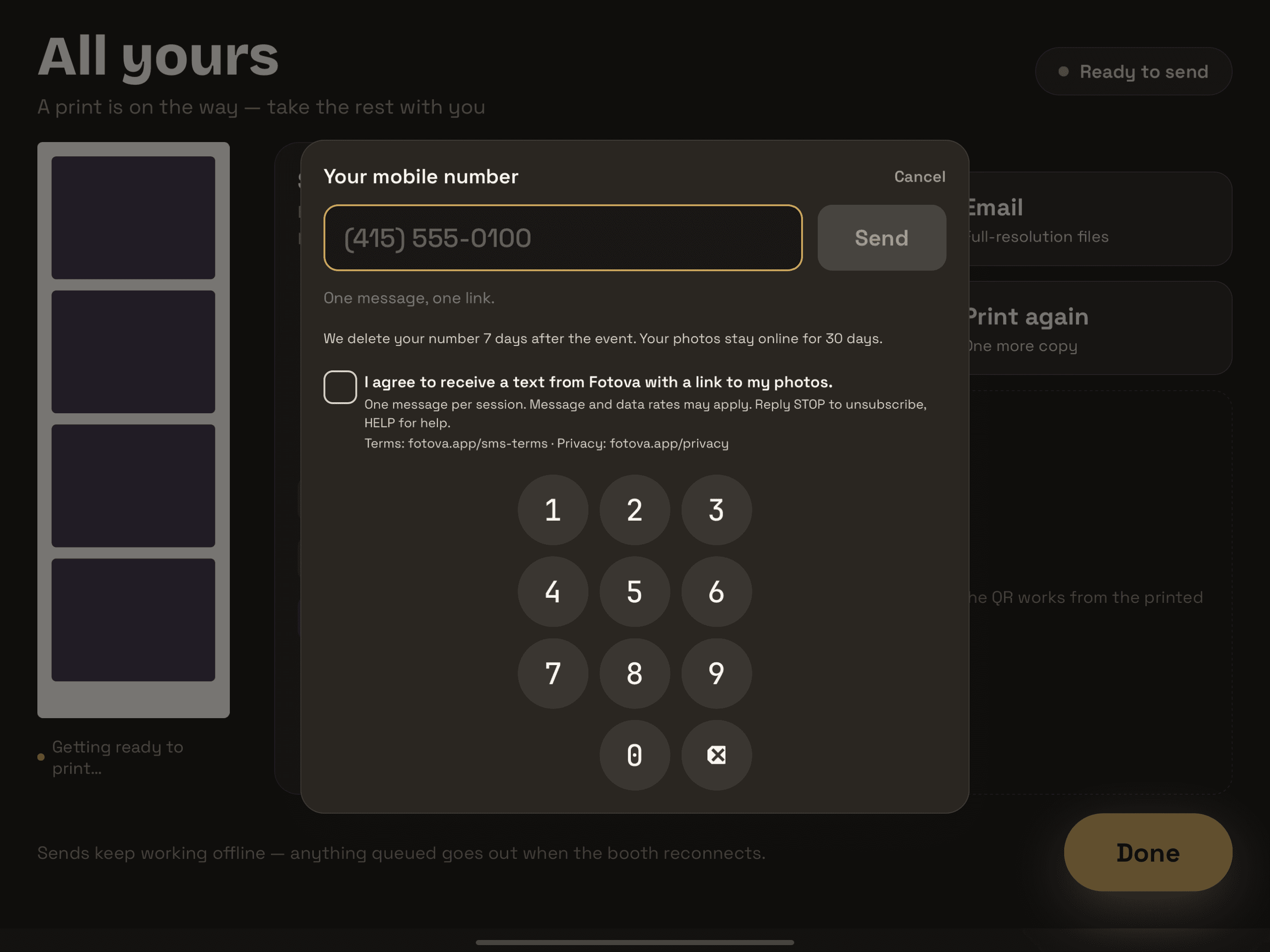

The exact consent wording
The checkbox a guest must actively check reads:
I agree to receive a text from Fotova with a link to my photos. One message per session. Message and data rates may apply. Reply STOP to unsubscribe, HELP for help.
The same screen displays the addresses of our SMS Terms and Privacy Policy. They appear as text rather than tappable links because the booth runs in a locked kiosk mode — a link would take a guest out of the booth and leave them holding the operator’s iPad.
Required disclosures
Stated here as well as on the booth screen, so they can be checked without reading a screenshot:
- Opt-in method: a digital form on a touchscreen. The guest types their own number and checks a box. This is the only way to opt in — there is no verbal script, no paper form, no keyword, and no QR opt-in.
- Message frequency: one message per photo session.
- Message and data rates may apply.
- Opt out: reply STOP. Help: reply HELP.
- Terms and conditions: fotova.app/sms-terms
- Privacy policy: fotova.app/privacy
What a guest receives
One message per photo session, sent within seconds of the request. The default text is:
Your photos from [Event Name] are ready: https://api.fotova.app/g/[session-id]
The operator running the booth may reword this message for their event. Whatever the wording, it always carries the guest's gallery link, and replying STOP or HELP to it works the same way.
We send no marketing and no recurring messages. Consent applies to that one session and is not reused: a guest at a later event checks the box again. Guest mobile numbers are deleted when the event's photos are, at the end of its retention window.
Stopping messages
Replying STOP to any message stops them. Replying HELP returns our contact details. Full program terms, including message frequency and carrier liability, are in the SMS Terms.
Fotova is a product of Notliss LLC.